> For the complete documentation index, see [llms.txt](https://docs.kiloiot.io/llms.txt). Markdown versions of documentation pages are available by appending `.md` to page URLs; this page is available as [Markdown](https://docs.kiloiot.io/account/organization-settings.md).
# Organization Settings
Owner-only Kilo IoT organization settings: rename the organization, transfer ownership, and edit billing details.
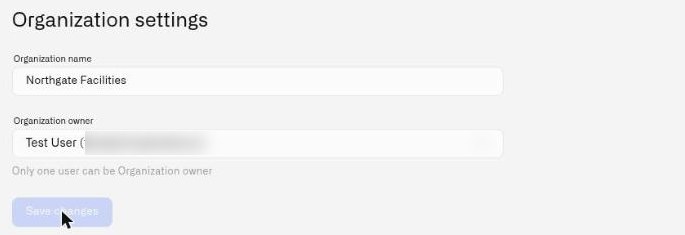
Organization settings is where you rename your organization, transfer ownership to another member, and — if your organization is billed by invoice — keep the company details that appear on those invoices. Only the organization owner can open it.
## Where to Find It
There are two routes, and both land on the same page:
* **Settings → Organization settings** in the sidebar.
* The user menu, opened by clicking your avatar in the sidebar.
If you do not see **Organization settings** in either place, you are not the owner of the current organization.
## Changing the Organization Name
1. Open Organization settings.
2. Edit the **Organization name** field. The name cannot be blank.
3. Click **Save changes**.
The new name takes effect immediately and is reflected everywhere the organization name appears — in the user menu, in page headers, and in the audit trail.
## Billing Details
Organizations that pay **by invoice** keep their company details here, in a **Billing details** section below the name and owner: **Legal name**, **Billing email**, the **Company address**, and a **Tax Id** with its type and number. A chip beside the Tax Id heading shows whether the number has been verified yet.
The section is saved with its own **Save** button, independently of the name and owner above it. If your organization pays by card you will not see it.
For what these details are used for, and what happens when an invoice goes unpaid, see [Billing and Invoices](/settings/billing-and-invoices.md).
## Transferring Ownership
Ownership transfer is a two-step process: the current owner initiates the transfer, and the new owner must accept it. The transfer does not happen immediately.
### Initiating the Transfer
1. Open Organization settings.
2. In the **Organization owner** dropdown, select the member you want to transfer ownership to. The dropdown lists all current members of the organization. The helper text reads: *"Only one user can be Organization owner."*
3. Click **Save changes**.
4. The system sends an ownership transfer invitation to the selected member. The invitation is valid for **24 hours**.
5. A success message confirms: *"We sent an invitation letter to the specified email."*
Until the new owner accepts the invitation, you remain the owner with full control.
### What Happens After Acceptance
Once the new owner accepts the transfer (see [Accepting Invitations](/account/accepting-invitations.md)):
* **The new owner** gets automatic access across the organization. The audit trail is read-only.
* **The previous owner** remains a member of the organization. They retain write access on all product surfaces except the audit trail, which becomes read-only.
* The **Organization settings** menu item moves to the new owner's user menu. The previous owner no longer sees it.
### Constraints
* **Only the current owner can initiate a transfer.** No other user can open Organization settings or change the owner field.
* **The target must already be an organization member.** You cannot transfer ownership to someone who has not yet joined the organization.
* **Only one active transfer invitation at a time.** If a transfer invitation is already pending, you cannot create another until it expires or is accepted.
* **No co-ownership.** There is always exactly one owner.
* **24-hour expiration.** If the new owner does not accept within 24 hours, the invitation expires and you remain the owner.
---
# Agent Instructions
This documentation is published with GitBook. GitBook is the documentation platform designed so that both humans and AI agents can read, navigate, and reason over technical content effectively. Learn more at gitbook.com.
## Querying This Documentation
If you need additional information that is not directly available in this page, you can query the documentation by asking a question.
Perform an HTTP GET request on the following URL with the `ask` and `goal` query parameters:
```
GET https://docs.kiloiot.io/account/organization-settings.md?ask=&goal=
```
`ask` is the immediate question: it should be specific, self-contained, and written in natural language.
`goal` is what the user is ultimately trying to achieve, the reason they need the answer. Sharing it helps GitBook give you a better, more relevant answer. A goal is most helpful when it describes the outcome the user wants rather than restating the question. For example, with `ask=how do I create an API token`, a goal like `automate deployments from our CI pipeline` lets GitBook tailor the answer to that use case.
The response will contain a direct answer to the question and relevant excerpts and sources from the documentation.
Use this mechanism when the answer is not explicitly present in the current page, you need clarification or additional context, or you want to retrieve related documentation sections.