> For the complete documentation index, see [llms.txt](https://docs.kiloiot.io/llms.txt). Markdown versions of documentation pages are available by appending `.md` to page URLs; this page is available as [Markdown](https://docs.kiloiot.io/ai-assistant/querying-your-data.md).
# Working With the Assistant
Query Kilo IoT Server in natural language — device status, history, threshold violations, follow-ups.
After setting up a deployment, use Kilo's **AI Assistant** to investigate how it is behaving. Ask which devices stopped reporting, compare a warehouse's temperature across two weeks, or find readings above a threshold. The assistant retrieves the relevant records and explains them in the same conversation you use to refine the setup.
Name the device or location and the period you want to examine. Follow-up questions can narrow the result without building a separate report. For device onboarding and automation configuration, start with [Building With the Assistant](/ai-assistant/building-with-ai.md).
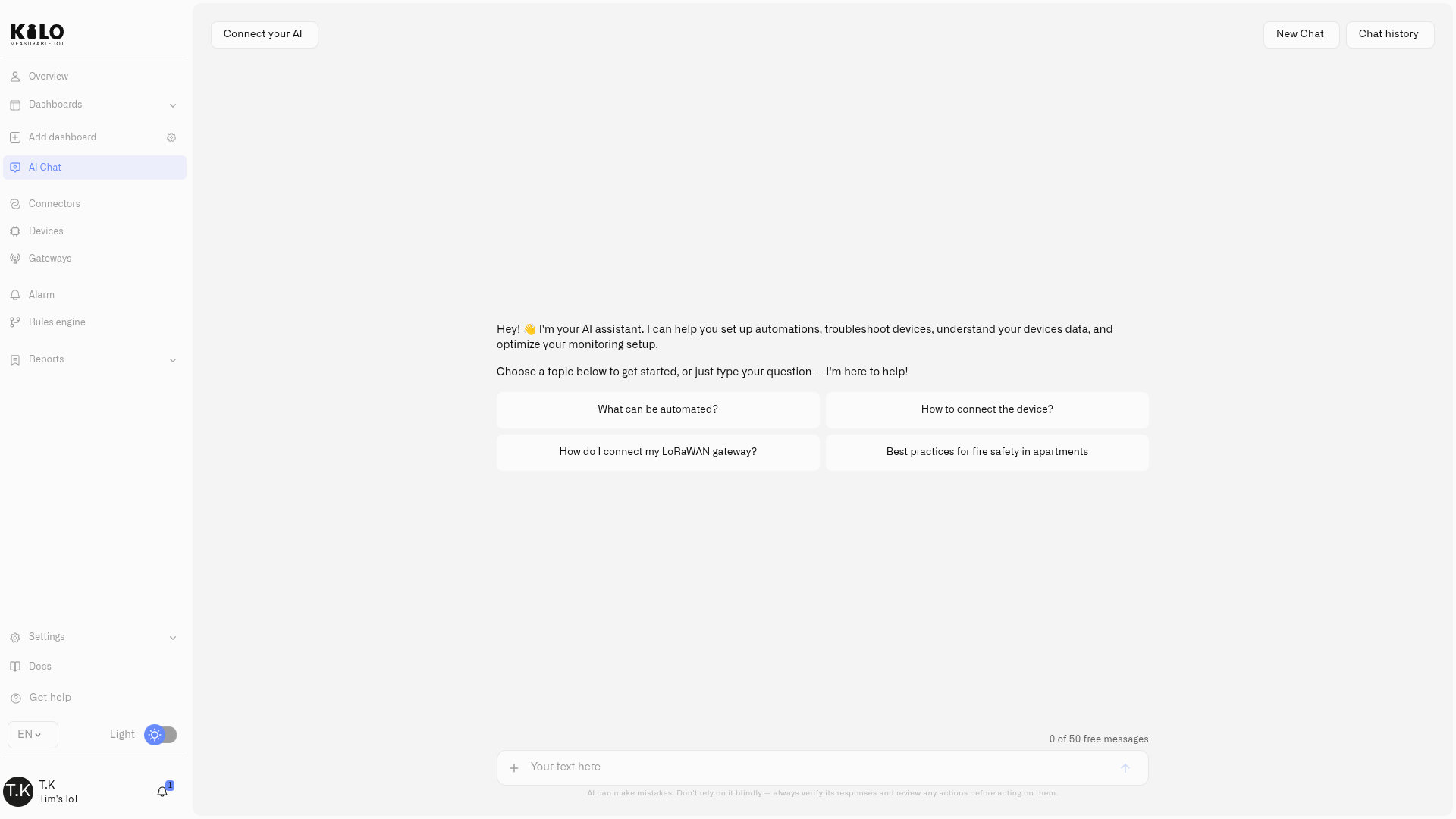
When you open **AI Chat**, a greeting and a few suggested topics get you started — select one, or just type your question in the box at the bottom.
## Writing effective queries
Check the timestamps and returned coverage when interpreting a result. A device that has stopped reporting may only have an old value, and the available history depends on retention.
A specific question produces a specific answer. Follow these guidelines to get the most useful results:
* **Name the device, sensor, or location.** "What is the temperature in Warehouse B?" is far more useful than "What is the temperature?" When dozens of sensors report temperature, the assistant needs to know which one you mean.
* **Use natural time expressions.** The assistant understands "yesterday", "last 3 hours", "between January 1 and January 15", "this morning", and similar phrases. There is no need to provide Unix timestamps or formatted dates.
* **Ask follow-ups.** The assistant uses the conversation context available to it. Refine, narrow, or expand a previous query without restating everything.
* **Reuse your last message.** Press the **Up arrow** key in the chat input to bring back the last message you sent — useful for tweaking a question and asking it again.
## Query categories
### Live status
Ask about the current state of your devices:
* "Which devices are offline?"
* "What is the current humidity in Server Room 3?"
* "Show me all devices with battery below 20%"
* "Is the rooftop gateway online?"
### Historical data
Query telemetry records over any time period your retention settings cover:
* "What was the average temperature in Cold Storage A last week?"
* "When did Freezer 3 last exceed -18 degrees Celsius?"
* "How many door-open events occurred after 10 PM this month?"
* "Show me all CO2 readings above 1000 ppm in the past 48 hours"
### Aggregations and comparisons
Perform calculations across devices, time ranges, or both:
* "Compare this week's temperature readings in Warehouse B with last week"
* "What was the maximum CO2 level in the lab today?"
* "Which zone had the highest average humidity in March?"
### Charts
Request visual charts and they render inline in the chat window:
* "Create a line chart of temperature for Sensor 5 over the past 7 days"
* "Show a bar chart comparing humidity across all warehouse sensors"
* "Pie chart of device status across the fleet"
* "Scatter plot of temperature versus humidity for Lab 1 this week"
Line charts work best for time-series trends, bar charts for cross-device or cross-period comparisons, pie charts for proportional breakdowns, and scatter charts for identifying correlations between two measurements.
### Documentation
Ask about any platform feature and the assistant searches the full knowledge base semantically:
* "How do I set up a LoRaWAN gateway?"
* "Explain the rules engine version history"
* "What notification channels are available?"
Answers include explanations and direct links to the relevant documentation pages.
## Multi-step conversations
The assistant remembers context within a session. Build on previous answers without repeating yourself:
1. "Show me temperature readings for Sensor 5 over the past week"
2. "Now expand that to the last month"
3. "Compare it with Sensor 6 over the same period"
4. "Which one had more threshold violations above 30 degrees?"
Each follow-up builds on the previous context, making complex analysis conversational rather than tedious.
## From asking to acting
The same conversation can move from analysis straight into action. After "which freezers breached −18 °C last night?", you can follow with "build a rule that alerts me if it happens again" — and the assistant authors and deploys it. Whenever a request would change something consequential, the assistant shows a confirmation with **Confirm Action** and **Cancel** first, so you stay in control of every change. The full build-and-operate workflow is covered in [Building With the Assistant](/ai-assistant/building-with-ai.md).
---
# Agent Instructions
This documentation is published with GitBook. GitBook is the documentation platform designed so that both humans and AI agents can read, navigate, and reason over technical content effectively. Learn more at gitbook.com.
## Querying This Documentation
If you need additional information that is not directly available in this page, you can query the documentation by asking a question.
Perform an HTTP GET request on the following URL with the `ask` and `goal` query parameters:
```
GET https://docs.kiloiot.io/ai-assistant/querying-your-data.md?ask=&goal=
```
`ask` is the immediate question: it should be specific, self-contained, and written in natural language.
`goal` is what the user is ultimately trying to achieve, the reason they need the answer. Sharing it helps GitBook give you a better, more relevant answer. A goal is most helpful when it describes the outcome the user wants rather than restating the question. For example, with `ask=how do I create an API token`, a goal like `automate deployments from our CI pipeline` lets GitBook tailor the answer to that use case.
The response will contain a direct answer to the question and relevant excerpts and sources from the documentation.
Use this mechanism when the answer is not explicitly present in the current page, you need clarification or additional context, or you want to retrieve related documentation sections.