> For the complete documentation index, see [llms.txt](https://docs.kiloiot.io/llms.txt). Markdown versions of documentation pages are available by appending `.md` to page URLs; this page is available as [Markdown](https://docs.kiloiot.io/alarm/escalation-and-response.md).
# Escalation and Response
Set up escalation chains for Kilo IoT alarms so unresolved events notify more recipients and channels over time.
Production incidents left unacknowledged become production outages. Escalation chains ensure that when the primary responder does not act within the expected window, the alarm reaches the next tier — supervisor, site manager, or on-call backup — automatically and through the appropriate channel.
## How escalation works
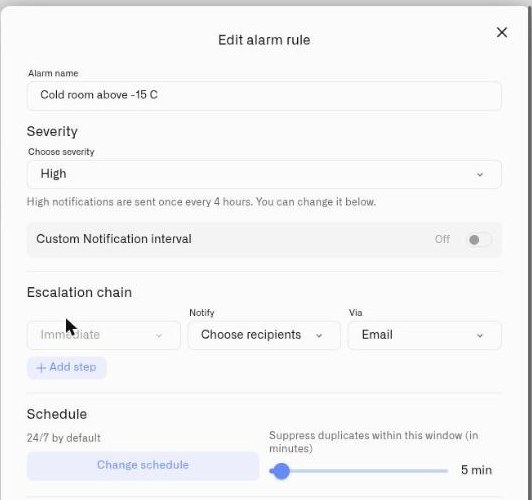
Every alarm definition includes an **Escalation chain** — an ordered sequence of notification steps that execute in response to an unresolved alarm event.
The first step fires **immediately** when the alarm is triggered. If the alarm remains unresolved after a configurable delay, the next step fires, notifying additional recipients through additional channels. The chain continues through each configured step until the alarm is either resolved or every step has been executed.
**Resolution halts escalation.** When a team member marks the alarm as resolved in the [Inbox](/alarm/inbox-and-resolution.md), no further escalation steps execute for that event. This is the intended mechanism for acknowledging and closing the loop on an operational alert.
## Configuring an escalation chain
The **Escalation chain** section appears inside every [alarm definition](/alarm/notification-rules.md). It is structured as an ordered list of steps.
### First step (Immediate)
The first step is always present and cannot be removed. Its delay is fixed to **Immediate** — recipients in this step receive notification the moment the alarm event is created.
Each step is configured with:
* **Notify** — One or more organization members selected from the **Choose recipients** dropdown. Recipients are drawn from the current organization's user list. **Required** — at least one recipient must be selected before the definition can be saved.
* **Via** — Delivery channels. Email and SMS are selectable in every step. Push notifications appear when enabled for the account and reach responders through the [IoT Alerts App](/alarm/iot-alerts-app.md) (see [Delivery Channels](/alarm/notification-channels.md)).
### Additional steps
Click **Add step** to append an escalation tier. Each additional step adds:
* **After** — A configurable delay before this step fires. The alarm must remain unresolved for the step to execute. If the alarm is resolved before the delay elapses, the step is skipped.
* **Notify** — Recipients for this tier (typically a different set from earlier steps — a supervisor or on-call backup).
* **Via** — Channels for this tier.
Additional steps can be removed with the delete button. Only the first step is permanent.
## Example: operations escalation
A cold-storage temperature exceedance alarm fires at 3 AM:
1. **Step 1 (Immediate):** On-call refrigeration technician receives email and push notification.
2. **Step 2 (after configurable delay):** If unresolved, shift supervisor receives SMS and email.
3. **Step 3 (after configurable delay):** If still unresolved, site operations manager receives SMS — indicating a potential compliance event that requires management awareness.
At any point, the technician, supervisor, or manager can resolve the alarm in the Inbox. Resolution immediately halts further escalation for that event.
## Designing escalation for production environments
**Align steps with your response hierarchy.** The first step should reach whoever is responsible for immediate triage. Subsequent steps should follow your organization's escalation policy — on-call to supervisor to management.
**Use distinct channels per tier.** If Tier 1 uses email, Tier 2 should include SMS. This reduces the risk that a single channel failure blocks the entire chain.
**Consider shift schedules.** Combine escalation with the alarm definition's [schedule configuration](/alarm/notification-rules.md) to route alarms to the correct on-call rotation. Outside of scheduled hours, alarms still fire but can be directed to a different escalation chain by using a separate alarm definition for off-hours conditions.
**Keep chains actionable.** Every step should reach someone who has both the authority and the ability to respond. Notifying ten people in the first step creates noise; a targeted chain with two or three tiers produces faster, more accountable response.
**Test under realistic conditions.** Run a controlled test alarm through the full escalation chain to verify that each step reaches the correct recipients through the correct channels within the expected timeframe.
---
# Agent Instructions
This documentation is published with GitBook. GitBook is the documentation platform designed so that both humans and AI agents can read, navigate, and reason over technical content effectively. Learn more at gitbook.com.
## Querying This Documentation
If you need additional information that is not directly available in this page, you can query the documentation by asking a question.
Perform an HTTP GET request on the following URL with the `ask` and `goal` query parameters:
```
GET https://docs.kiloiot.io/alarm/escalation-and-response.md?ask=&goal=
```
`ask` is the immediate question: it should be specific, self-contained, and written in natural language.
`goal` is what the user is ultimately trying to achieve, the reason they need the answer. Sharing it helps GitBook give you a better, more relevant answer. A goal is most helpful when it describes the outcome the user wants rather than restating the question. For example, with `ask=how do I create an API token`, a goal like `automate deployments from our CI pipeline` lets GitBook tailor the answer to that use case.
The response will contain a direct answer to the question and relevant excerpts and sources from the documentation.
Use this mechanism when the answer is not explicitly present in the current page, you need clarification or additional context, or you want to retrieve related documentation sections.