> For the complete documentation index, see [llms.txt](https://docs.kiloiot.io/llms.txt). Markdown versions of documentation pages are available by appending `.md` to page URLs; this page is available as [Markdown](https://docs.kiloiot.io/kilo-docs-de/kilo-iot-server/account/switching-organizations.md).
# Organisationen wechseln
Gehören Sie mit einem Konto zu mehreren Kilo-IoT-Organisationen — wechseln Sie den Kontext über die Liste „Meine Organisationen“ im Menü.
Ein einzelnes Kilo-IoT-Konto kann mehreren Organisationen angehören. Sie könnten der Eigentümer der primären Organisation Ihres Teams sein, in der Organisation eines Partners nur Lesezugriff haben und in einer Testumgebung Bearbeitungszugriff besitzen — alles unter einem einzigen Login. Beim Wechsel zwischen Organisationen ändert sich der Kontext der gesamten Benutzeroberfläche.
## Wo Sie es finden
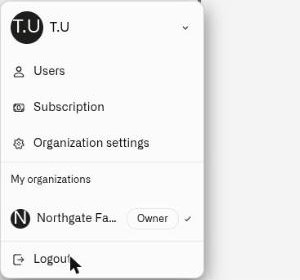
Öffnen Sie das Benutzermenü, indem Sie in der Seitenleiste auf Ihren Avatar klicken. Unter den Menüeinträgen sehen Sie den **Meine Organisationen** Abschnitt, der jede Organisation auflistet, der Sie angehören.
Jeder Organisationseintrag zeigt:
* Den Organisationsnamen
* Ein **Eigentümer** Abzeichen, wenn Sie der Eigentümer dieser Organisation sind
* Eine **Häkchen** neben der Organisation, in der Sie derzeit arbeiten
## So wechseln Sie
Klicken Sie in der Liste auf den Namen einer beliebigen Organisation. Die Benutzeroberfläche wechselt sofort in den Kontext dieser Organisation. Ihre Auswahl wird gespeichert — wenn Sie die Plattform das nächste Mal öffnen, wird die zuletzt ausgewählte Organisation wieder angezeigt.
## Was sich ändert
Wenn Sie zwischen Organisationen wechseln, spiegelt die Plattform den Umfang und die Berechtigungen der neuen Organisation wider. Organisationsgebundene Bereiche wie die Seite „Benutzer“ und der Audit Trail zeigen Daten der ausgewählten Organisation an. Ihr Zugriffslevel kann sich zwischen Organisationen unterscheiden — zum Beispiel können Sie in einer Organisation Besitzerzugriff und in einer anderen Betrachterzugriff haben.
## Wie Sie einer Organisation beitreten
Es gibt zwei Wege in eine Organisation:
* **Automatische Standardorganisation.** Wenn Sie erstmals auf die Plattform zugreifen, wird automatisch eine Standardorganisation für Sie erstellt. Siehe [Wie Organisationen entstehen](/kilo-docs-de/kilo-iot-server/account/how-organizations-start.md).
* **Einladung.** Ein Mitglied einer bestehenden Organisation lädt Sie ein, beizutreten. Siehe [Benutzer einladen](/kilo-docs-de/kilo-iot-server/account/inviting-users.md) und [Einladungen annehmen](/kilo-docs-de/kilo-iot-server/account/accepting-invitations.md).
Sie gehören immer mindestens einer Organisation an. Wenn Ihre Standardorganisation die einzige ist, zeigt der **Meine Organisationen** Abschnitt nur diesen einzelnen Eintrag an.
---
# Agent Instructions
This documentation is published with GitBook. GitBook is the documentation platform designed so that both humans and AI agents can read, navigate, and reason over technical content effectively. Learn more at gitbook.com.
## Querying This Documentation
If you need additional information that is not directly available in this page, you can query the documentation dynamically by asking a question.
Perform an HTTP GET request on the current page URL with the `ask` query parameter, and the optional `goal` query parameter:
```
GET https://docs.kiloiot.io/kilo-docs-de/kilo-iot-server/account/switching-organizations.md?ask=&goal=
```
`ask` is the immediate question: it should be specific, self-contained, and written in natural language.
`goal` is optional and describes the broader end goal you are ultimately trying to accomplish on behalf of the user. GitBook uses it to tailor the answer towards what is most useful for that goal.
The response will contain a direct answer to the question and relevant excerpts and sources from the documentation.
Use this mechanism when the answer is not explicitly present in the current page, you need clarification or additional context, or you want to retrieve related documentation sections.