> For the complete documentation index, see [llms.txt](https://docs.kiloiot.io/llms.txt). Markdown versions of documentation pages are available by appending `.md` to page URLs; this page is available as [Markdown](https://docs.kiloiot.io/kilo-docs-de/kilo-iot-server/get-help.md).
# Hilfe erhalten
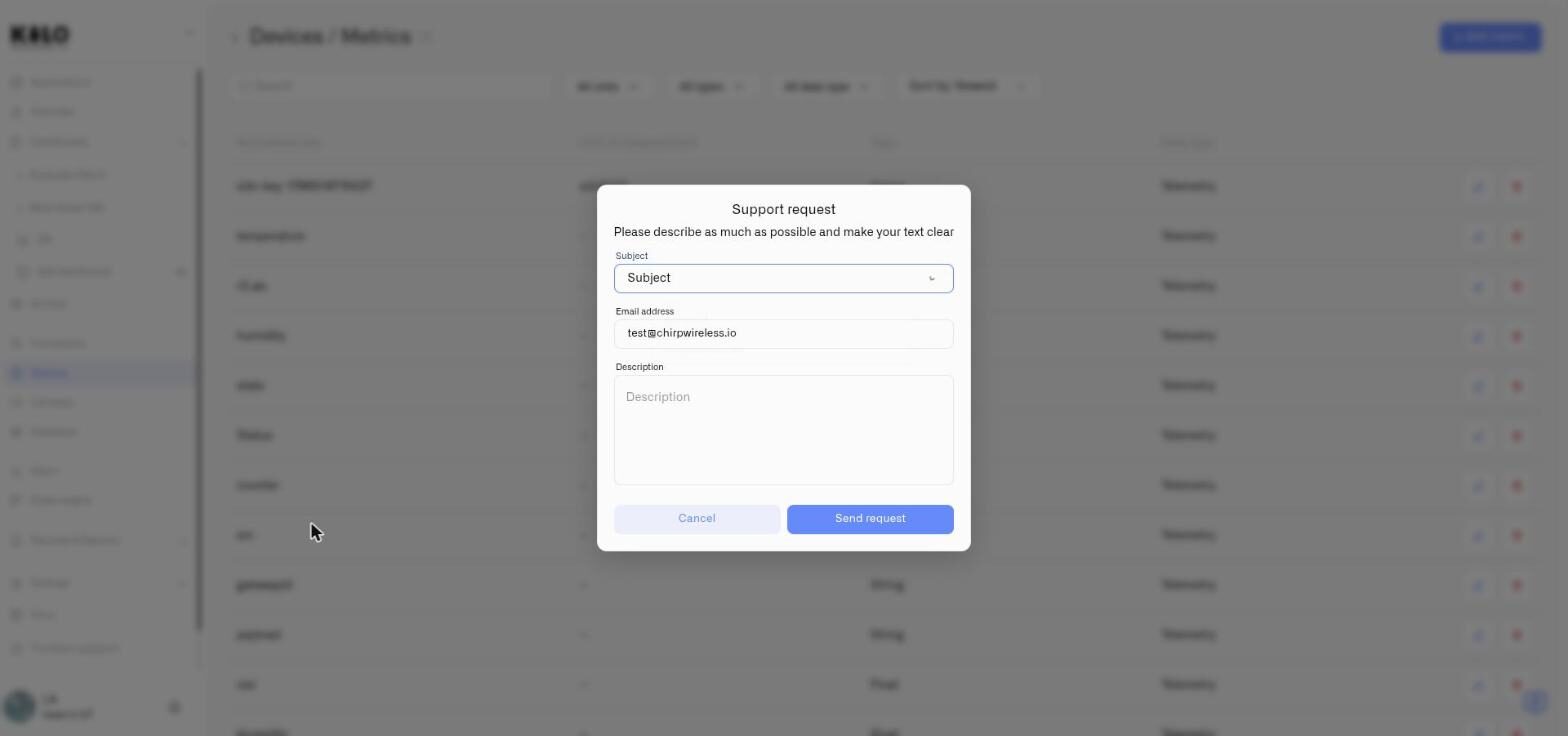
Senden Sie eine Supportanfrage direkt aus dem Kilo IoT Server — der Dialog im Produkt sendet Ihre Nachricht mit Kontext.
Der Dialog für Supportanfragen ist im gesamten Kilo IoT Server-Interface verfügbar. Er sendet Ihre Nachricht — zusammen mit Ihrem Kontokontext — direkt an das Kilo IoT Support-Team.
## Öffnen des Dialogs
Klicken Sie im Interface auf die Hilfe- oder Support-Option, um das Kontaktformular zu öffnen.
## Dialogfelder
| Feld | Erforderlich | Beschreibung |
| ------------------ | ------------ | -------------------------------------------------------------------------------------------------------------------------------------------------------------------------------------------------------------------------------------------- |
| **Betreff** | Ja | Ein Dropdown-Menü mit drei Auswahlmöglichkeiten — **Fehlerbericht**, **Funktionsanfrage** und **Integrationsanfrage**. Wählen Sie die passende Option; sie zeigt dem Team, um welche Art von Nachricht es sich handelt, bevor es sie öffnet. |
| **E-Mail-Adresse** | Ja | Vorbefüllt mit Ihrer E-Mail-Adresse im Konto. Sie können sie ändern, wenn die Antwort an eine andere Adresse gesendet werden soll. Das Feld prüft das E-Mail-Format auf Korrektheit. |
| **Beschreibung** | Ja | Eine detaillierte Erklärung, wobei Sie Hilfe benötigen. Der Dialog erinnert Sie daran: *"Bitte beschreiben Sie so viel wie möglich und formulieren Sie Ihren Text klar."* |
### Welche Betreffzeile zu wählen ist
Die drei Optionen sind absichtlich eng gefasst, weil jede an einen anderen Ort geht:
* **Fehlerbericht** — etwas an der Plattform verhält sich fehlerhaft. Beschreiben Sie, was Sie getan haben, was passiert ist und was Sie stattdessen erwartet haben; genau diese drei Angaben machen einen Bericht reproduzierbar.
* **Funktionsanfrage** — die Plattform tut etwas nicht, das Sie benötigen. Das gewünschte Ergebnis zu beschreiben ist hilfreicher, als das Bedienelement zu beschreiben, das Sie sich vorstellen — oft gibt es bereits eine Möglichkeit oder eine bessere.
* **Integrationsanfrage** — ein Gerät, ein Protokoll oder ein externes System, mit dem Kilo zusammenarbeiten soll. Nennen Sie die Hardware oder den Dienst konkret, einschließlich Modellnummern.
## Senden der Anfrage
Klicken Sie auf **Anfrage senden** zum Absenden. Bei Erfolg erscheint eine Bestätigungsbenachrichtigung -- *"Die Anfrage wurde erfolgreich gesendet"* -- das Formular wird geleert, und der Dialog schließt sich automatisch.
Wenn bei der Übermittlung etwas schiefgeht, wird eine Fehlermeldung angezeigt, damit Sie es erneut versuchen können.
Klicken Sie auf **Abbrechen** um das Formular zu verwerfen und den Dialog ohne Senden zu schließen.
---
# Agent Instructions
This documentation is published with GitBook. GitBook is the documentation platform designed so that both humans and AI agents can read, navigate, and reason over technical content effectively. Learn more at gitbook.com.
## Querying This Documentation
If you need additional information that is not directly available in this page, you can query the documentation dynamically by asking a question.
Perform an HTTP GET request on the current page URL with the `ask` query parameter, and the optional `goal` query parameter:
```
GET https://docs.kiloiot.io/kilo-docs-de/kilo-iot-server/get-help.md?ask=&goal=
```
`ask` is the immediate question: it should be specific, self-contained, and written in natural language.
`goal` is optional and describes the broader end goal you are ultimately trying to accomplish on behalf of the user. GitBook uses it to tailor the answer towards what is most useful for that goal.
The response will contain a direct answer to the question and relevant excerpts and sources from the documentation.
Use this mechanism when the answer is not explicitly present in the current page, you need clarification or additional context, or you want to retrieve related documentation sections.