> For the complete documentation index, see [llms.txt](https://docs.kiloiot.io/llms.txt). Markdown versions of documentation pages are available by appending `.md` to page URLs; this page is available as [Markdown](https://docs.kiloiot.io/kilo-docs-de/kilo-iot-server/settings/profile-settings.md).
# Profileinstellungen
Bearbeiten Sie Ihr Kilo-IoT-Server-Profil — Name, Avatar, Sprache, Design, Passwort — global für alle Organisationen.
Ihre Profilinformationen identifizieren Sie in jeder Organisation, der Sie auf dem Kilo IoT Server angehören. Änderungen, die Sie hier vornehmen, gelten global — Ihr Name und Avatar erscheinen in Prüfprotokollen, Teammitgliedslisten und Benachrichtigungsverläufen.
## Auf die Profileinstellungen zugreifen
Navigieren Sie zu **Einstellungen > Profileinstellungen** in der Seitenleiste.
## Ihr Profil bearbeiten
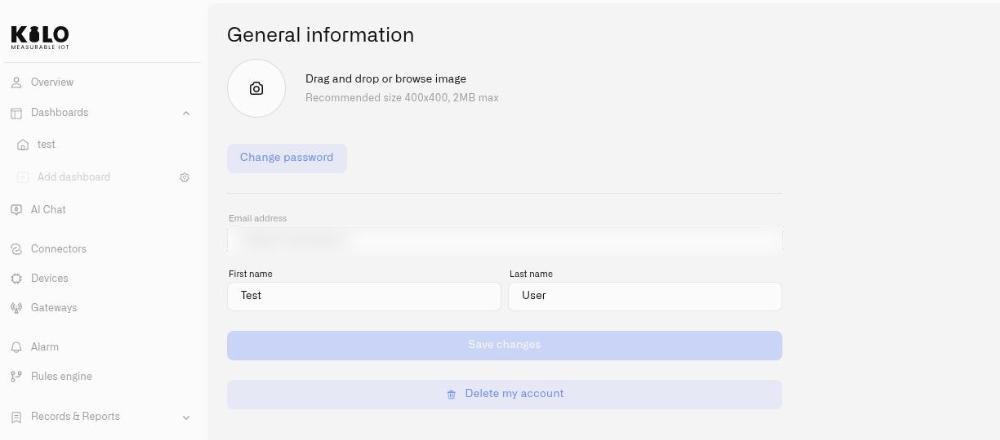
Die Profilseite enthält die folgenden Felder:
* **Vorname** und **Nachname** — bearbeitbare Texteingabefelder. Dies sind die Anzeigenamen, die andere Teammitglieder sehen.
* **Avatar / Foto** — ziehen Sie ein Bild per Drag-and-drop hierher oder klicken Sie zum Hochladen. Empfohlene Größe: 400 x 400 Pixel. Maximale Dateigröße: 2 MB. Akzeptierte Formate: JPEG, JPG, PNG.
* **E-Mail-Adresse** — wird zur Information angezeigt, kann auf dieser Seite jedoch nicht direkt geändert werden. Änderungen der E-Mail-Adresse werden über den Identitätsanbieter vorgenommen.
Klicken Sie auf **Änderungen speichern** wenn Sie fertig sind. Die Schaltfläche bleibt deaktiviert, bis Sie mindestens ein Feld ändern.
## Ihren Avatar verwalten
Sobald ein Avatar hochgeladen wurde, erscheint eine **Avatar löschen** Option. Beim Anklicken wird eine Bestätigung angezeigt: „Möchten Sie Ihren Avatar wirklich löschen?“ Wenn Sie bestätigen, wird das Bild entfernt und auf den Standard-Platzhalter zurückgesetzt.
## Ihr Passwort ändern
Klicken Sie auf **Passwort ändern** um zur Passwortverwaltungsseite des Identitätsanbieters weitergeleitet zu werden. Der Passwortänderungsprozess wird extern abgewickelt und findet nicht innerhalb der Kilo IoT Server-Oberfläche statt.
## Ihr Konto löschen
Klicken Sie unten auf der Profilseite auf **Mein Konto löschen**. Ein Bestätigungsdialog fragt: „Möchten Sie Ihr Konto wirklich löschen?“ Klicken Sie auf **Ja, Profil löschen** um die Anfrage abzusenden. Dadurch wird eine Löschanfrage an das Support-Team gesendet — Sie sehen die Bestätigung: „Ihre Anfrage wurde übermittelt.“ Die Kontolöschung wird vom Team bearbeitet und erfolgt nicht sofort.
---
# Agent Instructions
This documentation is published with GitBook. GitBook is the documentation platform designed so that both humans and AI agents can read, navigate, and reason over technical content effectively. Learn more at gitbook.com.
## Querying This Documentation
If you need additional information that is not directly available in this page, you can query the documentation dynamically by asking a question.
Perform an HTTP GET request on the current page URL with the `ask` query parameter, and the optional `goal` query parameter:
```
GET https://docs.kiloiot.io/kilo-docs-de/kilo-iot-server/settings/profile-settings.md?ask=&goal=
```
`ask` is the immediate question: it should be specific, self-contained, and written in natural language.
`goal` is optional and describes the broader end goal you are ultimately trying to accomplish on behalf of the user. GitBook uses it to tailor the answer towards what is most useful for that goal.
The response will contain a direct answer to the question and relevant excerpts and sources from the documentation.
Use this mechanism when the answer is not explicitly present in the current page, you need clarification or additional context, or you want to retrieve related documentation sections.