> For the complete documentation index, see [llms.txt](https://docs.kiloiot.io/llms.txt). Markdown versions of documentation pages are available by appending `.md` to page URLs; this page is available as [Markdown](https://docs.kiloiot.io/kilo-mioty-service-center.md).
# Kilo MIOTY Service Center
Three ways to run KiloCenter MIOTY Service Center - free open-source Community Edition, Enterprise in Kilo Cloud, or Enterprise on your premises.
Use the current installation examples only in an isolated evaluation environment with test data. Published credentials, signing-key defaults and network exposure need correction before customer use. Changing only the administrator password is insufficient. Read the [installation safety notice](/kilo-mioty-service-center/security/installation-safety.md) before running commands.
KiloCenter Community Edition is an **open-source MIOTY service center** for running the networking yourself. Connect **base stations**—MIOTY's radio gateways—register **endpoints**, the sensors or other communicating devices, and exchange their messages with your applications.
**Kilo Cloud includes the enterprise version of the service center and the full Kilo IoT platform around it.** The same MIOTY devices can feed widgets and dashboards, run automation rules, and raise alarms with escalation. Choose Cloud when you want to build and operate the application as well as connect the radio network.
## Which edition should I choose?
**KiloCenter Community Edition comes as is.** It is open source, has no software subscription fee, and is the complete self-hosted service-center path, not a trial. You provide and operate the infrastructure, deployments and modifications must follow the [AGPL-3.0-or-later license](/kilo-mioty-service-center/license-and-trademarks.md), and the community supports it through GitHub issues and discussions, with no guaranteed response time.
**If you need more than the Community Edition, you have two options:**
* **The Enterprise edition on your own premises.** Kilo installs it for you on request, with commercial support and the enterprise MIOTY capabilities. [Contact Kilo](https://kiloiot.io/contact/) to ask for it.
* **Kilo Cloud.** Choose it when you need more than a network server, together with everything the Kilo platform provides: the rules engine, dashboards and visualization, alerting and escalation, device management and access control. The Enterprise edition of the service center is built in, and Kilo operates it.
## KiloCenter Community vs Enterprise vs Kilo Cloud
Choose based on who runs the service center and whether you need a complete IoT operations platform around the network.
| Need | Community Edition | Enterprise edition on your premises | Kilo Cloud |
| --------------------------------------------------------- | -------------------------------------------------------- | -------------------------------------------------------------------------------------- | ------------------------------------------------------------------------- |
| MIOTY service center | Self-host the free, open-source Community Edition | Licensed Enterprise edition, installed by Kilo on your infrastructure | The Enterprise edition is built in and Kilo operates it |
| Base stations, endpoints, uplinks, and downlinks | Included | Included, with the enterprise MIOTY capabilities | Included through Kilo's [MIOTY connector](/connectors/mioty-connector.md) |
| Integrate MIOTY data with another system | Use gRPC or MQTT | Use gRPC or MQTT | Use Kilo APIs and connectors, or work with the data directly in Kilo |
| Visual dashboards and historical charts | Build or connect a separate application | Build or connect a separate application, or license the Kilo platform on-premise | Included in [Dashboards](/dashboards.md) |
| Visual automation and sustained-condition triggers | Build or connect a separate automation system | Build or connect a separate automation system, or license the Kilo platform on-premise | Included in the [Rules Engine](/rules-engine.md) |
| Operational alarms, notification channels, and escalation | Build or connect a separate alerting system | Build or connect a separate alerting system, or license the Kilo platform on-premise | Included in [Alarms](/alarm.md) |
| Multi-tenancy (organizations) | Not included | Included | Included |
| Hosting and operations | You host and operate it | Runs on your premises under a commercial license | Kilo hosts and operates it |
| Support | Community support on GitHub, no guaranteed response time | Commercial support from Kilo | Kilo support, with operational guarantees under enterprise terms |
Use **KiloCenter Community Edition** when the MIOTY network server is the product boundary and your team wants to host it, operate it, and connect its data to existing applications.
Use the **Enterprise edition on your premises** when the network must stay on your infrastructure but you need commercial support, multi-tenancy, and the enterprise MIOTY capabilities. [Contact Kilo](https://kiloiot.io/contact/) to license it.
Use **Kilo Cloud** when MIOTY is one part of a broader deployment. The Enterprise edition of the service center runs inside Kilo Cloud, and MIOTY endpoint data enters the same device-management, normalization, dashboard, rules, alarm, audit, and AI workflows as data from Kilo's other supported connectors. Start with the [Kilo IoT Platform overview](/kilo-iot-server.md).
## What Community Edition includes
* MIOTY base-station connections over BSSCI with certificate-based security
* Endpoint registration, attachment, uplink processing, and downlink support
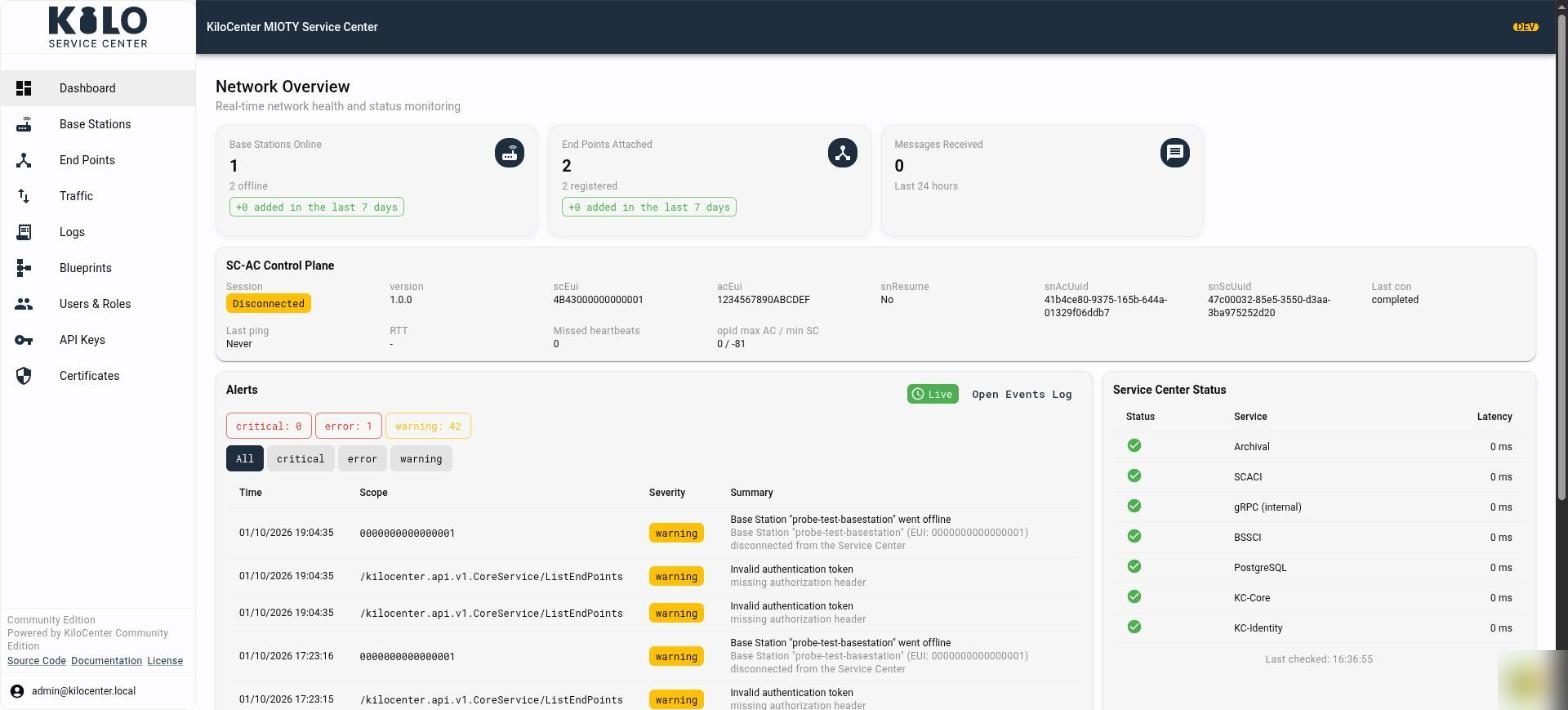
* A web console for service-center configuration and network monitoring; application dashboards, widgets, rules, and alerts belong to Kilo Cloud or your own downstream application
* gRPC and MQTT interfaces for downstream applications
* Docker Compose, Linux-host, and Kubernetes deployment paths
* Source code under AGPL-3.0-or-later
Read the [Project Overview](/kilo-mioty-service-center/project-overview.md) for the architecture, components, supported MIOTY behavior, and production-use boundaries.
## What is new in version 2.0?
Version 2.0 adds a live web interface, encrypted key storage, enforced user roles and end-to-end BSSCI and SCACI conformance. It needs a few manual steps when you upgrade from 1.x. It is also a large cleanup, with more than fifty bugs fixed. Read [What's new in KiloCenter 2.0?](/kilo-mioty-service-center/whats-new-in-2-0.md), see [what was fixed](/kilo-mioty-service-center/whats-fixed-in-2-0.md) and take a tour of the [web interface](/kilo-mioty-service-center/web-interface.md).
## Start here
1. Follow [Getting Started](/kilo-mioty-service-center/getting-started.md) to install Community Edition.
2. Use [Onboarding](/kilo-mioty-service-center/onboarding.md) to connect a base station and register an endpoint.
3. Choose [Integrations](/kilo-mioty-service-center/integrations.md) to send MIOTY data to your application.
4. Review [Security](/kilo-mioty-service-center/security.md) before exposing a deployment outside a development network.
5. Use [Operations](/kilo-mioty-service-center/operations.md) for monitoring and troubleshooting.
If you do not want to operate a service center—or you also need rules, visualization, alarms, access control, and managed operations—start with [MIOTY on Kilo Cloud](/connectors/mioty-connector.md).
---
# Agent Instructions
This documentation is published with GitBook. GitBook is the documentation platform designed so that both humans and AI agents can read, navigate, and reason over technical content effectively. Learn more at gitbook.com.
## Querying This Documentation
If you need additional information that is not directly available in this page, you can query the documentation by asking a question.
Perform an HTTP GET request on the following URL with the `ask` and `goal` query parameters:
```
GET https://docs.kiloiot.io/kilo-mioty-service-center.md?ask=&goal=
```
`ask` is the immediate question: it should be specific, self-contained, and written in natural language.
`goal` is what the user is ultimately trying to achieve, the reason they need the answer. Sharing it helps GitBook give you a better, more relevant answer. A goal is most helpful when it describes the outcome the user wants rather than restating the question. For example, with `ask=how do I create an API token`, a goal like `automate deployments from our CI pipeline` lets GitBook tailor the answer to that use case.
The response will contain a direct answer to the question and relevant excerpts and sources from the documentation.
Use this mechanism when the answer is not explicitly present in the current page, you need clarification or additional context, or you want to retrieve related documentation sections.