> For the complete documentation index, see [llms.txt](https://docs.kiloiot.io/llms.txt). Markdown versions of documentation pages are available by appending `.md` to page URLs; this page is available as [Markdown](https://docs.kiloiot.io/kilo-mioty-service-center/operations/audit-log-and-errors-center.md).
# Audit Log and Errors Center
Use the KiloCenter Logs page: read the Events Log, group failures in the Errors Center, and review who did what in the Audit Log, with filters and roles.
Open **Logs** in the left menu to see everything KiloCenter records about itself. The page has three tabs, **Events Log**, **Errors Center** and **Audit Log**, and each tab answers a different question: what happened, what keeps failing, and who changed something.
## Who can see which Logs tab?
| Tab | Who sees it | What they see |
| ------------- | --------------------------------------------------- | ----------------------------------------------------------------------------- |
| Events Log | Admins, Base Station Managers and Endpoint Managers | Only the event categories their roles cover |
| Errors Center | Admins, Base Station Managers and Endpoint Managers | Each sub-tab only when their roles cover every category it groups (see below) |
| Audit Log | Admins only | Every audit event of the installation |
A user whose roles do not cover a tab sees "No access to this view". A role change applies within `grpc.rbac_role_cache_ttl_seconds`, 30 seconds by default, without signing in again. [User Roles and Permissions](/kilo-mioty-service-center/security/users-and-roles.md) lists which roles see which event categories.
## What does the Events Log show?
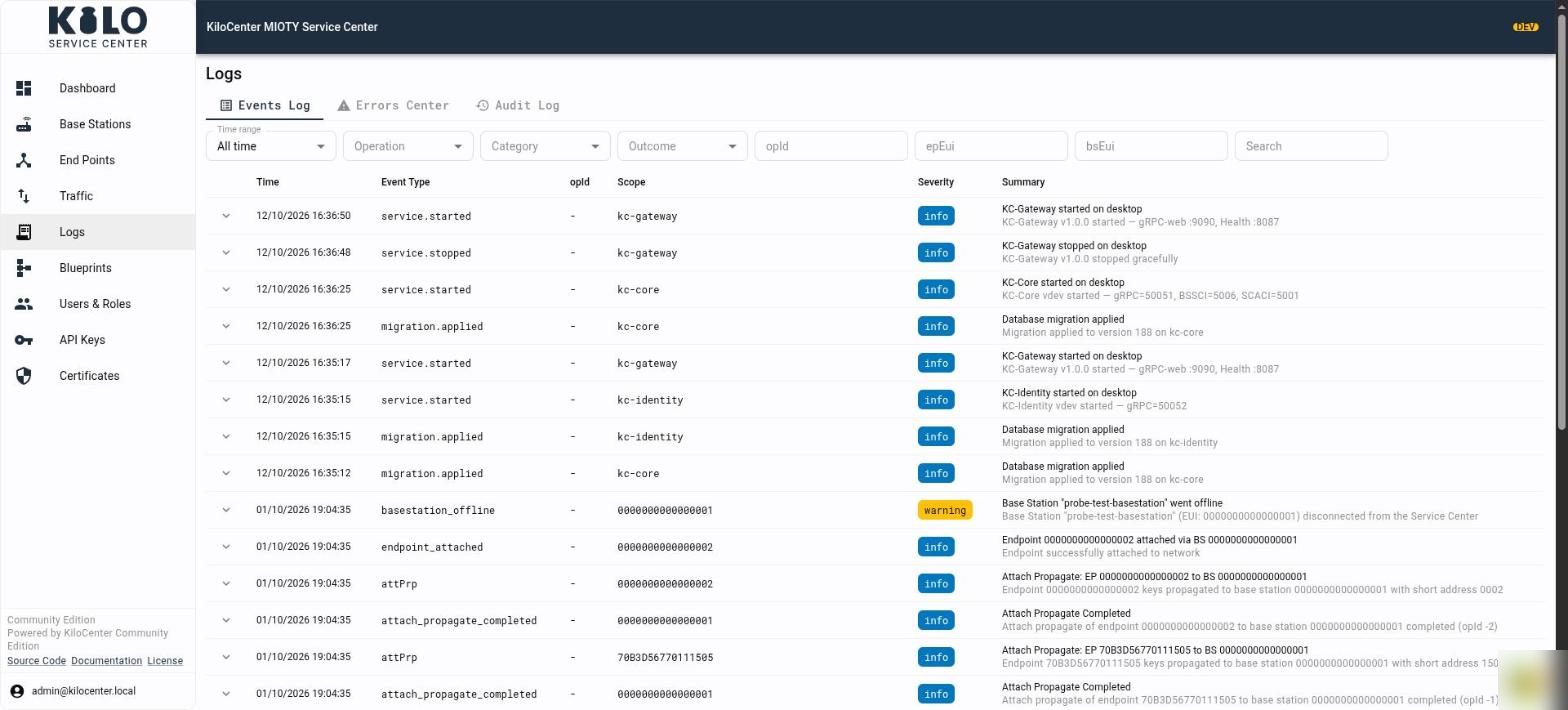
The **Events Log** lists everything that happened, newest first. Each row has a time, an event type, the `opId` of the operation, a scope (the base station, end point or service involved), a severity and a summary. Select the arrow at the start of a row to expand its data.
Filter the list with the controls above the table:
* **Time range** limits the rows to the last hour, day, week or month, or shows all time.
* **Operation**, **Category** and **Outcome** narrow the list to one kind of event.
* **opId**, **epEui** and **bsEui** follow a single operation, end point or base station.
* **Search** looks through the event text.
The Events Log updates by itself, so a service start, a base station going offline or an attach appears within about a second.
## What does the Errors Center show?
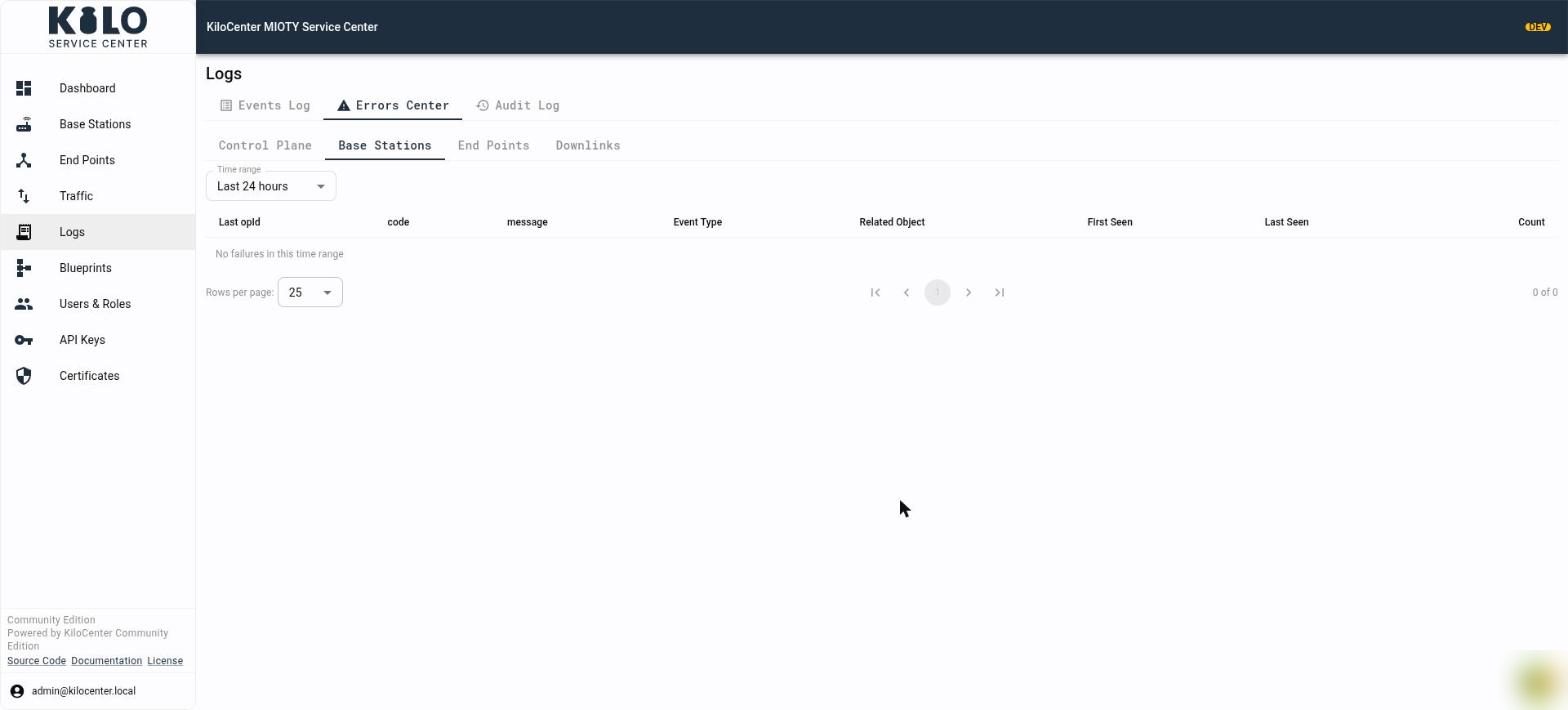
The **Errors Center** shows failures only, and it groups repeats so that a problem that happens a hundred times appears as one row with a count.
Choose one of four sub-tabs. Each groups failures from specific event categories, and you can open a sub-tab only when your roles cover all of its categories:
| Sub-tab | What it groups | Who can open it |
| ----------------- | ------------------------------------------------------------------------------------------------------------------------------------------------------- | -------------------------------- |
| **Control Plane** | Errors and critical events from the Application Center connection (SCACI), sessions, protocol, security and system events, plus failed SCACI operations | Admins |
| **Base Stations** | Errors and critical events from base stations and the BSSCI protocol, such as refused connections and protocol errors | Admins and Base Station Managers |
| **End Points** | Errors and critical events about end points, such as a failed attach or detach | Admins and Endpoint Managers |
| **Downlinks** | Warnings, errors and critical events about downlinks: expired, refused, failed or undeliverable ones | Admins and Endpoint Managers |
Every sub-tab has a **Time range** dropdown with **Last hour**, **Last 24 hours**, **Last 7 days** and **Last 30 days**. It starts at the last 24 hours, and each sub-tab keeps its own range, so set it again after you switch sub-tabs. The Errors Center always looks back a fixed window; it has no "all time" option.
Each row of the table is one group of identical failures:
| Column | Meaning |
| -------------------------------- | ----------------------------------------------------------------------------- |
| **Last opId** | The operation id of the most recent failure, or `-` when the failure has none |
| **code** | The error code, or `-` |
| **message** | What failed, for example which end point and which queue id |
| **Event Type** | The kind of event, such as `dl_data_expired` |
| **Related Object** | The end point, base station or service the failure belongs to |
| **First Seen** and **Last Seen** | When the failure first and last happened inside the range |
| **Count** | How many times it happened |
An empty table with "No failures in this time range" is good news. A group on the **Downlinks** sub-tab with `dl_data_expired` means a downlink waited for its end point's downlink window until its lifetime ran out and was reported as expired; see [How do I verify the first downlink?](/kilo-mioty-service-center/onboarding/verify-the-first-downlink.md).
## What does the Audit Log record?
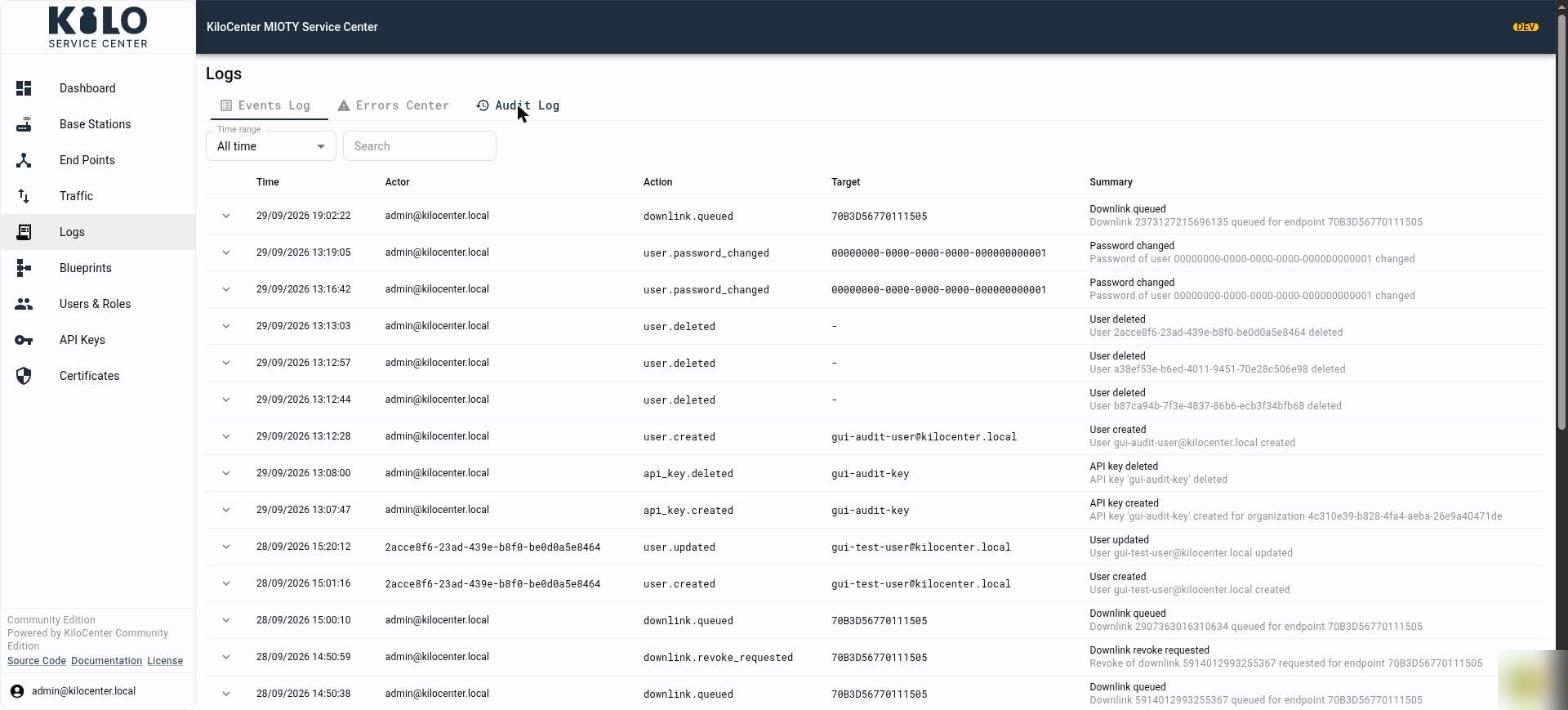
The **Audit Log** records the actions of people and API keys, so you can answer who did what and when. Only administrators can open it, because the entries cover the whole installation.
Each row has a **Time**, the **Actor** (the user's email, or the user id when the account no longer exists), the **Action**, the **Target** the action touched and a **Summary**. Select the arrow at the start of a row to expand its data. Use **Time range** to limit the list and **Search** to find an actor, action or target.
The audit events include:
| Action | Recorded when |
| ----------------------------------------------------------------------------------------- | --------------------------------------------------------------------------------------------------------------------------- |
| `user.created`, `user.updated`, `user.deleted` | An administrator adds, changes or removes a user |
| `user.registered` | Someone creates their own account; no credential enters the entry |
| `user.password_changed` | A user changes their own password or an administrator resets it |
| `api_key.created`, `api_key.deleted` | An API key is created or deleted |
| `endpoint.keys_revealed` | Someone reveals an end point's network session key or application key |
| `endpoint.keys_removed` | Someone removes a stored application key |
| `certificate.private_key_downloaded` | Someone downloads a base station's private key |
| `downlink.queued`, `downlink.updated`, `downlink.revoke_requested` | An operator queues a downlink, edits a pending one, or asks a base station to revoke one, from the web interface or the API |
| `organization.created`, `organization.updated`, `organization.deleted` | An organization is added, changed or removed (Enterprise edition) |
| `organization.member_added`, `organization.member_updated`, `organization.member_removed` | A user joins an organization, has a role or permission changed, or leaves it (Enterprise edition) |
| `integration.created`, `integration.updated`, `integration.deleted` | An integration is added, changed or removed |
| `certificate.server_generated`, `certificate.server_renewed` | The server certificate is generated for the first time or renewed |
Entries about keys name who acted and which key of which end point or station, and never contain the key. KiloCenter writes the audit entry before it hands out a secret. If the event store cannot take the record, the request fails and the secret stays protected, so there is no unrecorded reveal or download.
## Where do I find the same information for one device?
Open the base station or end point and select its **Activity** tab. It uses the same columns as the Events Log, filtered to that device, and it applies the same role rules. See [What can I do in the KiloCenter web interface?](/kilo-mioty-service-center/web-interface.md).
## What should I do when the Audit Log or an event list will not load?
If a tab shows "Could not load this list", check that KC-Core and the event store (PostgreSQL) are healthy on the Dashboard under **Service Center Status**, then read the KC-Core log. The checks are in [Operations and Troubleshooting](/kilo-mioty-service-center/operations/operations-and-troubleshooting.md).
---
# Agent Instructions
This documentation is published with GitBook. GitBook is the documentation platform designed so that both humans and AI agents can read, navigate, and reason over technical content effectively. Learn more at gitbook.com.
## Querying This Documentation
If you need additional information that is not directly available in this page, you can query the documentation by asking a question.
Perform an HTTP GET request on the following URL with the `ask` and `goal` query parameters:
```
GET https://docs.kiloiot.io/kilo-mioty-service-center/operations/audit-log-and-errors-center.md?ask=&goal=
```
`ask` is the immediate question: it should be specific, self-contained, and written in natural language.
`goal` is what the user is ultimately trying to achieve, the reason they need the answer. Sharing it helps GitBook give you a better, more relevant answer. A goal is most helpful when it describes the outcome the user wants rather than restating the question. For example, with `ask=how do I create an API token`, a goal like `automate deployments from our CI pipeline` lets GitBook tailor the answer to that use case.
The response will contain a direct answer to the question and relevant excerpts and sources from the documentation.
Use this mechanism when the answer is not explicitly present in the current page, you need clarification or additional context, or you want to retrieve related documentation sections.