> For the complete documentation index, see [llms.txt](https://docs.kiloiot.io/llms.txt). Markdown versions of documentation pages are available by appending `.md` to page URLs; this page is available as [Markdown](https://docs.kiloiot.io/rules-engine.md).
# IoT Rules Engine
Visual BPMN rules engine — turn sensor data into alarms, actions, and enrichment with safe build and rollback.
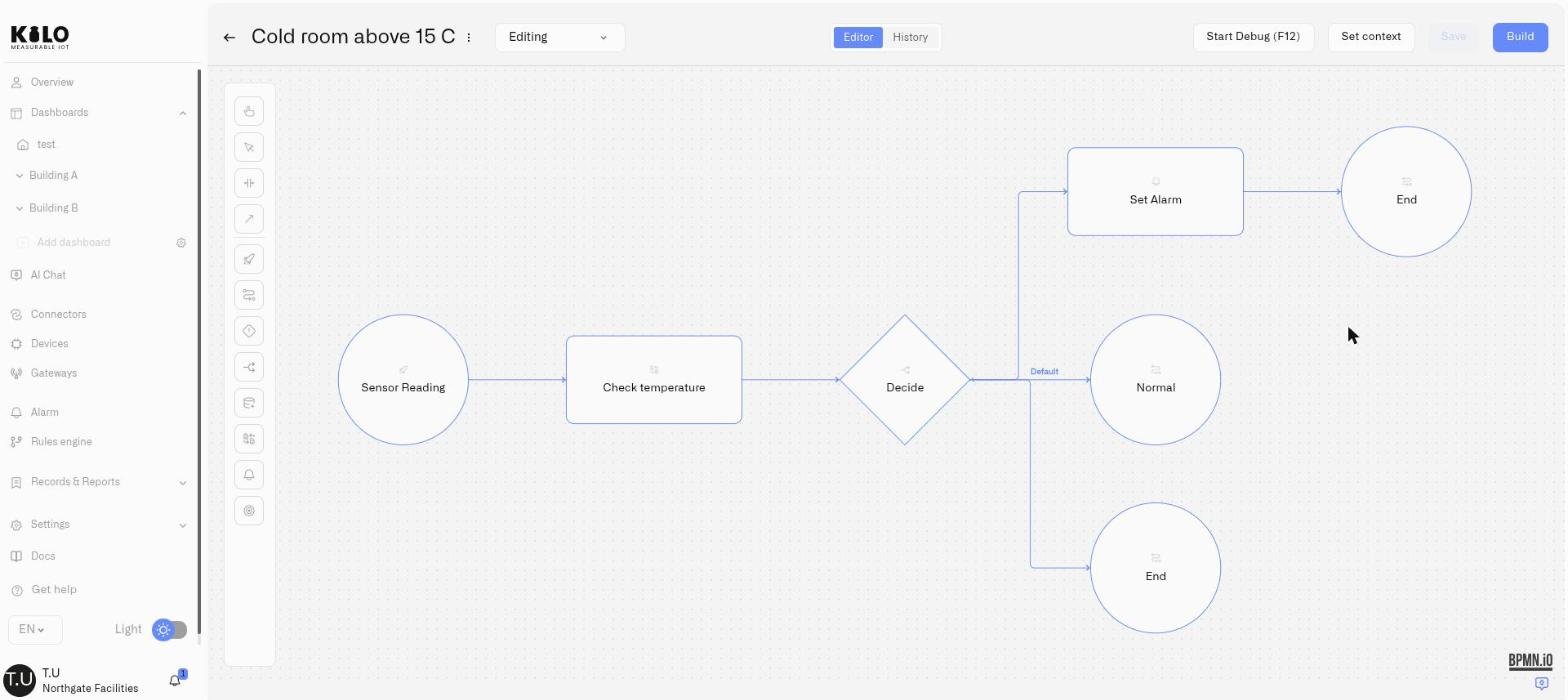
Kilo's Rules Engine lets you build a response around the way your site operates: check a reading, fetch another sensor for context, choose a branch, notify a team, or send a device command. A **rule** is that saved workflow. You draw its steps and connecting arrows so the response is visible and reviewable.
You can inspect a rule step by step in [debug mode](/rules-engine/debugging-rules.md), keep a history of changes, and choose when a built version goes live. This gives a team room to improve an automation while the deployed version continues running. The [AI Assistant](/ai-assistant/building-with-ai.md) can also build and deploy rules from a description of the behavior you need.
A **trigger** watches device readings for a condition, such as a cold room staying too warm for ten minutes. A **rule** supplies the response. Save them separately in the **Triggers** and **Rules** tabs, then connect the trigger to the rule. A rule can also start directly from one sensor reading. See [Triggers](/rules-engine/triggers.md#what-is-the-difference-between-a-trigger-and-a-rule) for the distinction and setup.
## How it works
The editor uses BPMN 2.0 (Business Process Model and Notation), a standard notation for workflow diagrams. Each step is a **node**, and each connecting arrow is a **flow**. The engine executes a deployed rule when its Start Event receives the selected source: either a reading from one sensor or a signal from a saved trigger condition. The rule must be running; its schedule and execution-rate limits determine whether it can process that input.
Every rule follows a managed lifecycle:
```
Create → Edit → Build → Deploy → Running → Stop
```
Changes you make in the visual editor stay in draft until you explicitly build and deploy them. The build step validates your rule — checking the diagram structure, verifying all expressions, and confirming that every path is complete. Only after a successful build can you deploy the rule to start processing its selected sensor or trigger source.
## What you can build
A rule starts with a **Start Event**. Choose **Sensor reading** for incoming readings from one selected sensor, or **Trigger condition** for signals from a saved condition watching one or more devices. A trigger may act immediately or require a qualifying period first. An active trigger can signal again on further readings, so the response can repeat. Inside the rule, you can:
* **Evaluate conditions** with Exclusive Gateways — route the flow to different branches based on CEL expressions
* **Transform data** with Script Tasks — compute derived values, classify readings, or prepare flags for downstream decisions
* **Fetch data from other sensors** with Enrichment nodes — compare indoor vs. outdoor temperature, correlate humidity with occupancy, or check a reference reading before deciding
* **Raise alarms** with Set Alarm nodes — trigger alarm definitions with dynamic motivation messages, kicking off escalation policies and notifications
* **Act on devices** with Execute Command nodes — send a command (close a valve, push a setpoint, switch a relay) straight to a device when conditions are met, as part of the configured response. Command verification depends on the device and command settings. See [Running Device Commands](/rules-engine/running-device-commands.md)
* **Handle errors gracefully** with Boundary Error Events — if a step fails (for example, a sensor is offline during enrichment), catch the error and route to a fallback path instead of stopping the entire rule
All conditions and computations use [CEL](https://cel.dev) (Common Expression Language) — a safe, sandboxed expression language designed for evaluating conditions. CEL cannot access files, make network calls, or run loops. It only evaluates expressions against the data you provide.
That balance is deliberate. Most day-to-day rules are assembled by dragging nodes onto the canvas and filling in forms. CEL appears in focused places where the rule needs exact logic: gateway conditions, Script Tasks, dynamic alarm messages, enrichment lookups, and input/output mappings. Through CEL, the rule logic can become very sophisticated — nested conditions, computed severity classifications, multi-sensor delta calculations, and dynamic decision paths that go far beyond simple threshold alerts. You are not forced into arbitrary scripts, but you are also not limited to basic "if value > X" conditions.
## IoT automation testing and version control
For [physical AI](/physical-ai.md), the Rules Engine supplies the execution lifecycle around device actions: edit and test the logic, build a release, inspect the running artifact, and restore an available earlier version when a change needs correcting. A restored version is a draft until rebuilt and deployed; it does not undo past physical actions.
The Rules Engine is designed for environments where unmanaged automation changes are not acceptable:
* **Edit locks** — Only one person can edit a rule at a time. Others see who holds the lock and when it expires. Organization owners can force-unlock if needed.
* **Autosave** — Your work is saved automatically while you edit, with visible status feedback ("Saving...", "Saved", "Autosave Failed").
* **Version history** — Every save creates a version. Versions can be renamed, viewed, and restored. If a change causes unexpected behavior, restore an available previous version as a new draft while preserving history.
* **Build before deploy** — The build step catches structural errors, invalid expressions, and missing connections before your rule reaches production.
* **Artifacts** — Each build produces a named artifact with timestamps, author, and optional comments. The Artifacts tab shows exactly what's deployed across all your rules.
* **Trash and recovery** — Deleting a rule moves it to trash, not permanent deletion. You can restore rules from trash.
* **Emergency safety** — The system monitors rule execution health and automatically stops rules that encounter sustained errors, preventing cascading failures.
## Section contents
| Page | What it covers |
| ------------------------------------------------------------------------------------- | --------------------------------------------------------------------------------------- |
| [Rules List and Navigation](/rules-engine/rules-list-and-navigation.md) | The main Rules Engine page — tabs, actions, and how to navigate |
| [Creating Rules](/rules-engine/creating-rules.md) | How to create a new rule from scratch |
| [Triggers](/rules-engine/triggers.md) | Saved conditions, timing, device selection, and how to connect a trigger to a rule |
| [Visual Editor](/rules-engine/visual-editor.md) | The BPMN canvas — palette, properties panel, and toolbar |
| [Debugging Rules](/rules-engine/debugging-rules.md) | Step through a rule before deploying it — breakpoints, variables, watches, side effects |
| [Node Reference](/rules-engine/node-reference.md) | Every node type with configuration details and examples |
| [Running Device Commands](/rules-engine/running-device-commands.md) | The Execute Command node — make a rule act on a device, not just alert |
| [CEL Reference](/rules-engine/cel-reference.md) | Expression language types, operators, and patterns |
| [Edit Locks and Team Handoffs](/rules-engine/edit-locks-and-team-handoffs.md) | Locking, force-unlock, inactivity, and autosave |
| [Version History and Restore](/rules-engine/version-history-and-restore.md) | Version tracking, naming, viewing, and restoring |
| [Builds, Artifacts, and Deployment](/rules-engine/builds-artifacts-and-deployment.md) | Building rules, the Artifacts tab, deploying, and stopping |
| [Trash and Recovery](/rules-engine/trash-and-recovery.md) | Soft delete, the trash view, and restoring rules |
| [Automation Patterns](/rules-engine/automation-patterns.md) | Enterprise automation patterns with CEL examples |
| [Troubleshooting](/rules-engine/troubleshooting.md) | Build errors, common issues, and limits |
---
# Agent Instructions
This documentation is published with GitBook. GitBook is the documentation platform designed so that both humans and AI agents can read, navigate, and reason over technical content effectively. Learn more at gitbook.com.
## Querying This Documentation
If you need additional information that is not directly available in this page, you can query the documentation dynamically by asking a question.
Perform an HTTP GET request on the current page URL with the `ask` query parameter, and the optional `goal` query parameter:
```
GET https://docs.kiloiot.io/rules-engine.md?ask=&goal=
```
`ask` is the immediate question: it should be specific, self-contained, and written in natural language.
`goal` is optional and describes the broader end goal you are ultimately trying to accomplish on behalf of the user. GitBook uses it to tailor the answer towards what is most useful for that goal.
The response will contain a direct answer to the question and relevant excerpts and sources from the documentation.
Use this mechanism when the answer is not explicitly present in the current page, you need clarification or additional context, or you want to retrieve related documentation sections.